

Understanding OAuth for Beginners
R
Hy this is me Ritik sharma . i am software developer
Search for a command to run...
Hy this is me Ritik sharma . i am software developer
is there any feedback for next auth type called openID connect
In the series we are are seeing top authentication method used in software industries
In today’s digital world, where users often have to navigate multiple platforms and applications, understanding authentication mechanisms is essential. In this article, we will demystify the concepts of Single Sign-On (SSO), Security Assertion Markup...
If you’ve ever stared at the VS Code GitHub Copilot documentation and felt completely overwhelmed by .github/copilot-instructions.md, AGENTS.md, and custom agents, you aren't alone. Recently, I went d
1. The Pre-Digital World — Manual Detection Only Before computers, copyright enforcement was essentially pattern recognition by humans. A music producer would hear a familiar tune. A studio would notice a copied film scene. The entire process rel...
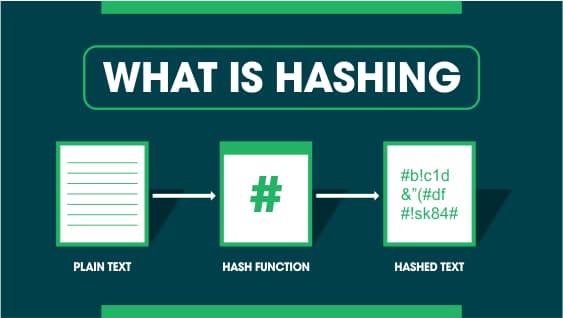
Introduction Security in web development and computer science revolves around ensuring data confidentiality, integrity, and authenticity. Developers often come across terms like hashing, encryption, and digital signatures. These concepts play a cruci...
Web development often feels straightforward: fetch data from a database, perform operations, and send the processed data to the client. However, the deeper complexities of handling data efficiently and maintaining scalable code require understanding ...

To understand this, you should know about basic authentication, JWT tokens, session-based authentication, and related concepts.
When you visit a website and are prompted to sign in or sign up using Google, Facebook, Twitter, or similar services, you experience the convenience of accessing another website without typing a username and password. This is facilitated by OAuth 2.0, a protocol designed for secure authorization.
OAuth 1.0 and OAuth 2.0 both aim to secure the workflow of authorizing users, but they differ in protocols and methods. OAuth 2.0 was developed to address the limitations of OAuth 1.0, such as its complexity and inability to support modern web and mobile applications effectively. Unlike OAuth 1.0, OAuth 2.0 is simpler to implement, offers better support for a wide range of devices and apps, and improves security by using tokens instead of secret keys in the authorization process. OAuth 1.0 is limited to web applications and lacks support for modern development needs such as single-page frameworks (SPFs) and mobile apps. OAuth 2.0 addresses these limitations and is widely adopted in the industry.
IdPs (Identity Providers): Services that provide identity on behalf of the user (e.g., Google, Facebook, GitHub, Twitter).
SP (Service Providers): Any web application where you see options to log in via Google, GitHub, Facebook, etc.
Access Token: A token that represents the authorization granted to the client (SP) by the user and allows access to the user’s data.
Refresh Token: A token used to obtain a new access token without needing to re-authenticate the user.

Most people have accounts on popular platforms like Google, Facebook, and GitHub. These platforms are commonly used as identity providers because they offer extensive user bases, reliable security measures, and convenience for both users and service providers. By leveraging these platforms, users can quickly authenticate without creating new accounts, while service providers benefit from reduced account management overhead and enhanced user experience. These platforms store information like your email, profile picture, and other data. When you need to share this data with another service, OAuth 2.0 streamlines this process by asking for your consent before sharing your data.
User visits SP: You visit a service provider (SP) like example.com.
Click Login with Google: You choose to log in with Google.
SP redirects to Google: The SP redirects you to Google's authentication server.
Authenticate with Google: Google asks you to authenticate (if not already logged in) and then requests your consent to share your data with the SP.
Google sends a token: After you grant consent, Google sends a token to the SP. This token typically contains information about the user's identity and the permissions granted, allowing the SP to access specific resources on the user's behalf. It is essential for the OAuth workflow as it securely communicates the user's consent and identity to the SP without exposing sensitive information like passwords.
SP verifies the token: The SP sends this token back to Google’s authorization server to verify its validity.
Access token issued: Upon successful verification, Google issues an access token to the SP.
Access resource: The SP uses this access token to request your data from Google’s resource server, which then provides your information to the SP.
Imagine a kingdom where the king (resource server) has many resources, and the king’s friend (user) wants to share these resources with others (SPs). This analogy can be compared to the real-world OAuth process where the resource server holds the user's data, and the user authorizes specific service providers to access this data using tokens. Just as the friend in the kingdom grants access through a security guard, OAuth utilizes access tokens to ensure secure and controlled data sharing.
The authentication server acts like a security guard. The king’s friend tells the guard, "If someone comes on my behalf, give them my resources."
The guard asks, "How will I know it’s them?" The friend replies, "I will give them a secret code (token)."
When someone (SP) comes with the secret code, the guard (authentication server) verifies it and sends a messenger (authorization server) to the king.
The king remembers the agreement and provides an access token, which the SP presents to the soldiers (resource server) guarding the resources.
The soldiers verify the access token and grant access to the resources.
Why doesn’t the resource server provide your password? The resource server only shares your data, like email and profile picture, but not sensitive information like your password for security reasons.
How does SP handle subsequent logins?
Security Note: This process ensures that your sensitive information, such as passwords, is never shared with the SP. Instead, only necessary user data is provided, reducing the risk of unauthorized access.
User clicks "Login with Google".
A unique token is obtained from Google.
The SP extracts the email and google_sub (a unique ID for each user).
The SP checks its database:
If google_sub exists: The user is logged in.
If the email exists but google_sub does not: A conflict is handled by saving the Google UID in google_sub and logging the user in.
If neither exists: A new user is created.
User clicks "Login with Google".
A unique token is obtained from Google.
The SP extracts the email and google_sub (a unique ID for each user).
The SP checks its database:
If google_sub exists: The user is logged in.
If the email exists but google_sub does not: A conflict is handled by saving the Google UID in google_sub and logging the user in.
If neither exists: A new user is created.
In conclusion, OAuth 2.0 is a powerful and widely adopted protocol that enhances the security and convenience of user authentication across various platforms. By allowing users to authenticate through trusted identity providers like Google, Facebook, and GitHub, OAuth 2.0 streamlines the login process and reduces the need for multiple accounts and passwords. This protocol not only improves user experience but also provides service providers with a secure method to access user data with consent. Understanding the workflow and components of OAuth 2.0 is essential for developers and businesses looking to implement secure and efficient authentication systems in their applications.